

Atrium
Design Tokens
Understanding the design token architecture used in Atrium components.
Components come with a default design-system based on design tokens. This guide explains the token architecture and how to customise it for your projects.
What Are Design Tokens?
Design tokens are the atomic values that define your visual design language. They create a single source of truth that keeps your UI consistent and makes theming straightforward.
/* Tokens are defined as CSS custom properties */
:root {
  --color-primary: #3b82f6;
  --spacing-md: 16px;
  --font-size-base: 1rem;
}
Token Categories
Primitives vs Semantic Tokens
Primitives are raw values without context:
:root {
  --blue-500: #3b82f6;
  --blue-600: #2563eb;
  --gray-100: #f3f4f6;
  --gray-900: #111827;
}
Semantic tokens reference primitives and provide meaning:
:root {
  --color-primary: var(--blue-500);
  --color-primary-hover: var(--blue-600);
  --color-background: var(--gray-100);
  --color-text: var(--gray-900);
}
This separation allows you to change your entire colour palette by updating primitives, while semantic tokens maintain their purpose.
Spacing
Spacing tokens follow a consistent scale based on a 4px base unit:
| Token | Value | Use Case |
|---|---|---|
--spacing-xs | 4px | Tight spacing, icon gaps |
--spacing-sm | 8px | Compact elements, small gaps |
--spacing-md | 16px | Default spacing, padding |
--spacing-lg | 24px | Section spacing |
--spacing-xl | 32px | Large gaps |
--spacing-2xl | 48px | Major section breaks |
--spacing-3xl | 64px | Page-level spacing |
--spacing-4xl | 96px | Hero sections |
Usage in Components
.card {
  padding: var(--spacing-md);
  gap: var(--spacing-sm);
  margin-bottom: var(--spacing-lg);
}
Colours
Semantic Colour Tokens
| Token | Purpose |
|---|---|
--color-primary | Brand colour, primary actions |
--color-secondary | Secondary actions, accents |
--color-background | Page background |
--color-surface | Card and component backgrounds |
--color-text | Primary text |
--color-text-muted | Secondary/helper text |
--color-border | Borders and dividers |
--color-error | Error states |
--color-success | Success states |
--color-warning | Warning states |
Defining a Colour Palette
:root {
  /* Primitives */
  --brand-50: #eff6ff;
  --brand-100: #dbeafe;
  --brand-500: #3b82f6;
  --brand-600: #2563eb;
  --brand-700: #1d4ed8;

  /* Semantic */
  --color-primary: var(--brand-500);
  --color-primary-hover: var(--brand-600);
  --color-primary-active: var(--brand-700);
}
Theming with Modes
Support dark mode and other themes using CSS custom properties:
:root {
  --color-background: #ffffff;
  --color-surface: #f9fafb;
  --color-text: #111827;
  --color-text-muted: #6b7280;
}

[data-theme="dark"],
.dark {
  --color-background: #111827;
  --color-surface: #1f2937;
  --color-text: #f9fafb;
  --color-text-muted: #9ca3af;
}

/* Or use media query for system preference */
@media (prefers-color-scheme: dark) {
  :root:not([data-theme="light"]) {
    --color-background: #111827;
    --color-surface: #1f2937;
    --color-text: #f9fafb;
    --color-text-muted: #9ca3af;
  }
}
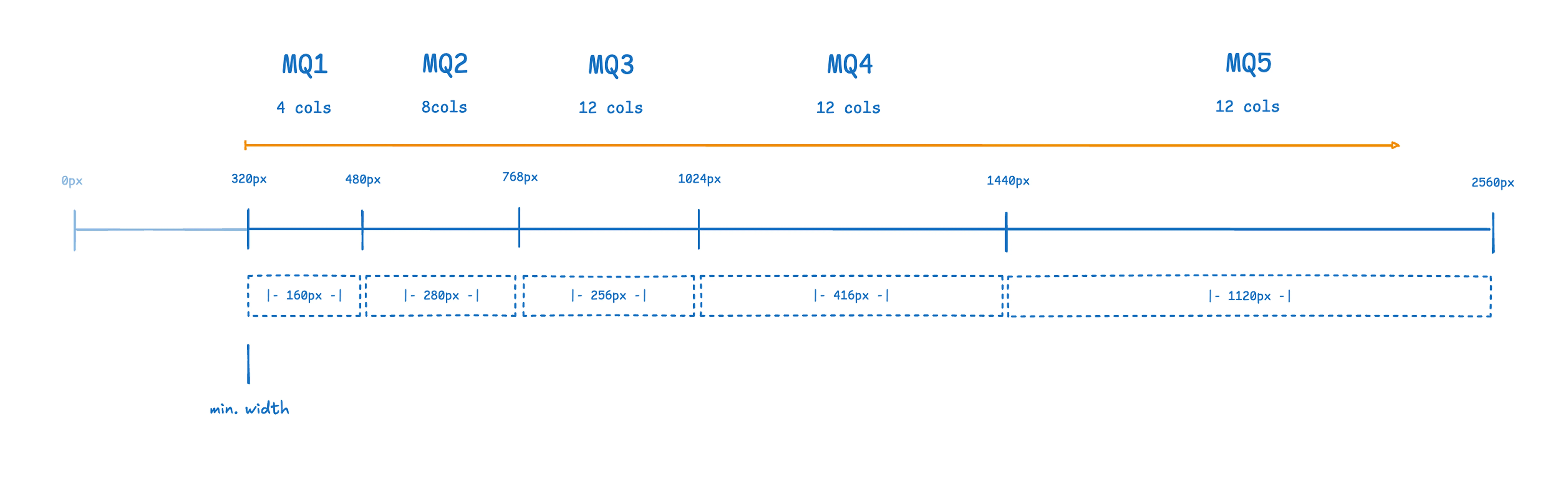
Grid and Breakpoints
Grid System
The layout uses a flexible grid based on CSS Grid:
.grid-container {
  display: grid;
  grid-template-columns: repeat(12, 1fr);
  gap: var(--spacing-md);
  max-width: var(--container-max);
  margin: 0 auto;
  padding: 0 var(--spacing-md);
}
Breakpoints
| Breakpoint | Width | Description |
|---|---|---|
sm | 640px | Small devices, large phones |
md | 768px | Tablets |
lg | 1024px | Small laptops |
xl | 1280px | Desktops |
2xl | 1536px | Large screens |
Usage with TailwindCSS:
<div class="grid grid-cols-1 md:grid-cols-2 lg:grid-cols-4 gap-4">
  <!-- Responsive grid -->
</div>
Typography
Font Scale
| Token | Size | Line Height | Use Case |
|---|---|---|---|
--font-size-xs | 0.75rem (12px) | 1rem | Captions, labels |
--font-size-sm | 0.875rem (14px) | 1.25rem | Small text, metadata |
--font-size-base | 1rem (16px) | 1.5rem | Body text |
--font-size-lg | 1.125rem (18px) | 1.75rem | Lead paragraphs |
--font-size-xl | 1.25rem (20px) | 1.75rem | Small headings |
--font-size-2xl | 1.5rem (24px) | 2rem | Section headings |
--font-size-3xl | 1.875rem (30px) | 2.25rem | Page headings |
--font-size-4xl | 2.25rem (36px) | 2.5rem | Hero headings |
Font Families
:root {
  --font-sans: ui-sans-serif, system-ui, sans-serif;
  --font-serif: ui-serif, Georgia, serif;
  --font-mono: ui-monospace, monospace;
}
Typography Classes
.typo-title-1 {
  font-size: var(--font-size-4xl);
  font-weight: 700;
  line-height: 1.2;
}

.typo-title-2 {
  font-size: var(--font-size-3xl);
  font-weight: 600;
  line-height: 1.3;
}

.typo-headline {
  font-size: var(--font-size-xl);
  font-weight: 600;
  line-height: 1.4;
}

.typo-body {
  font-size: var(--font-size-base);
  line-height: 1.5;
}
Using Tokens in Elements
Elements accept CSS custom properties for customisation:
/* Customise the calendar element */
a-calendar {
  --calendar-hover-bg: rgba(0, 0, 0, 0.1);
  --calendar-selected-bg: var(--color-primary);
  --calendar-selected-color: white;
}

/* Customise the range slider */
a-range {
  --range-handle-background: var(--color-primary);
  --range-progress-background: var(--color-primary);
  --range-track-background: var(--color-border);
}
Each element's documentation lists its available CSS custom properties.
Tailwind
When using TailwindCSS, create a theme with your tokens, css variables will be created automatically:
@theme custom {
  --color-primary: #3b82f6;
  --color-secondary: #2563eb;
  --color-surface: #f9fafb;

  ...
}
Then use in your components:
<button class="bg-primary text-white">
  Click me
</button>